We wanted to see how far AI could take a real piece of studio work. So we asked Claude Code, an AI coding tool, to make an Instagram ad for our free website audit.
Claude researched the brief, suggested ideas and wrote the code that made the film. We set the direction, watched the drafts and asked for changes. Some of the most useful corrections came from listening to the music and looking at the picture ourselves.
The experiment gave us a practical view of what AI can do for this kind of work, and where our judgement still matters. Here is the finished 18-second ad.
By The Artist Studio.
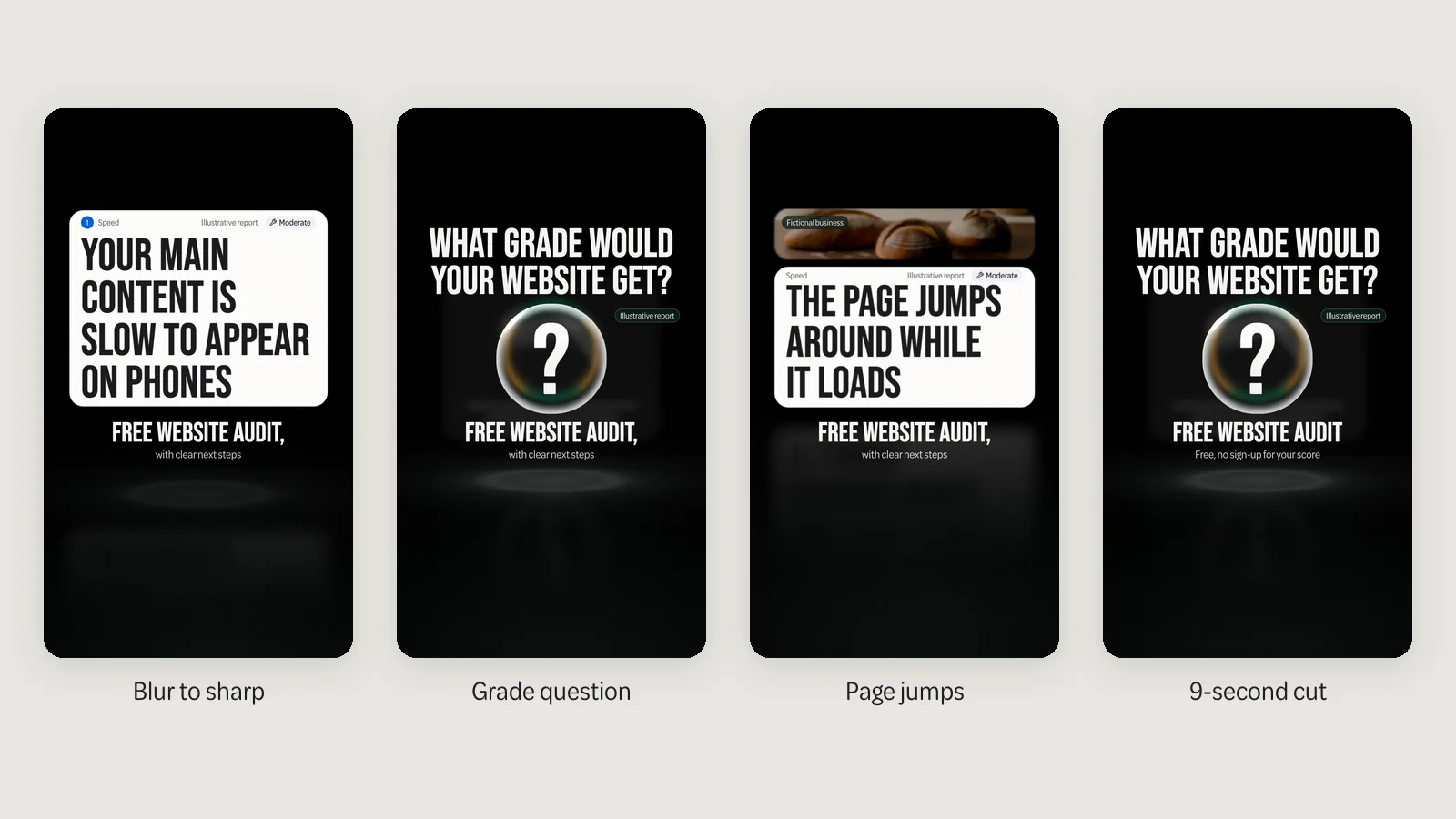
The grade-question version of our ad. The score and fixes are an illustrative report; Hollowell Bakehouse is a fictional business.
What we asked Claude to do
The ad had one job: encourage a business owner to check their website. It needed to explain the offer clearly enough for someone scrolling through Instagram to understand it.
We asked Claude to study the audit page and our brand before proposing ideas. The brief left room for it to suggest the visuals and music. We then asked for several openings so we could compare different ways of introducing the same offer.
One asks what grade your website would get. Another brings a blurred page into focus. A third shows a page jumping as it loads. Each leads into a report and ends with an invitation to check your own site.
The last frame echoes the audit page's address box and button. Someone following the link should recognise the next step. That connection mattered to us more than adding another effect to the film.
We also had to be precise about what “free” meant. The score and top three fixes need no sign-up. The full fix list needs an email address. Those details belong in the ad as well as on the page it sends people to. Someone should be able to understand the commitment before following the link.
How it made the ad
Claude wrote the code for the moving text, glass effects and music. HyperFrames, a tool that turns web-page code into video, rendered the film. Blender, a 3D design programme, rendered the bakery images from scenes Claude also wrote as code.
We did not use an AI image, video or music generator. The software drew the images and assembled the animation from the code. That distinction matters when people talk about an “AI-made video”: there are several ways to make one, with different strengths and limitations.
For an ad showing a website and a report, this approach gave us specific things to check. We could read the on-screen wording, compare it with the real offer and ask for changes to the layout. The text stayed as text throughout the build.
The fictional bakery gave the ad a website to demonstrate. Its bread images were made in Blender too, rather than taken from a stock library. Real photography remains important when the subject is your own product, premises or people.

Watching it changed the film
Claude checked its work as it went. Automated checks helped find technical faults, including flashing and text-placement problems. Those checks were useful, but watching the film still changed what we were willing to put out.
The soundtrack was the clearest example. Claude had checked it by measurement. When we listened, the music seemed to stop and start. We asked for a continuous soundtrack and for the sound to stay steady over the closing frame. Claude made the changes.
Centring was another. The automated reviews checked the layout against a guide in the storyboard. That guide was slightly left of the middle of the picture, so a layout could pass the check and still look wrong. We spotted the problem in the finished films and asked Claude to centre them properly.
We also changed the opening. An early draft led with the name of a website speed measurement. It was accurate, but it was a poor introduction for someone who just wanted to know whether their website needed work. The later openings put a recognisable problem or a plain question first.
The report needed attention too. An early version promised three fixes but made only one easy to read. The final film gives the viewer a chance to read all three. We judged those changes against the purpose of the ad: helping a business owner understand what they would get.
These were decisions about how the ad felt to a viewer. The checks could tell us about the file and its layout. We still had to decide whether the words made sense, the picture looked balanced and the music sounded right.
What it cost
The work ran within our existing Claude Team subscription. We made no extra software purchases. The other tools, fonts and sound effects were free to use or covered by licences we already held, and we bought no stock images, footage or music.
The work still needed our attention. We had to write the brief, watch the films and explain what needed changing. Claude did most of the building, but the finished ad depended on those decisions too.
Another project would need its own brief and budget. Our experience shows what we could make with the tools already available to us.
What we learned
AI did a substantial amount of the making, from researching the offer to building the animation. It also helped check the work. We could ask for another opening or a change to the music and have Claude work on the same shared source.
Our review mattered most when we approached the film as a viewer would. Listening revealed a problem that measurements had missed. Looking at the full picture revealed an alignment problem that the guide had hidden.
That is a useful lesson for any business trying AI on creative work. Give it a clear job, make sure the claims match what you offer and review the finished piece in the way a customer will experience it. For video, that includes watching it with the sound on.
The finished film shows what we made. Understanding whether it brings enquiries requires campaign results. We have kept those two questions separate throughout this account.
Try the free website audit
The ad points to a tool you can use on your own website. Your score and top three fixes are free, with no sign-up. The full fix list is free with your email, with plain-English explanations of what to improve.
The audit itself uses Google Lighthouse, Google's website-testing tool. Its explanations are pre-written; an AI service does not generate them when you enter your address.
If you want help with what it finds, our team in Sherborne designs, builds and improves websites for businesses across Dorset and Somerset. You can check your website or talk to us about the fixes.