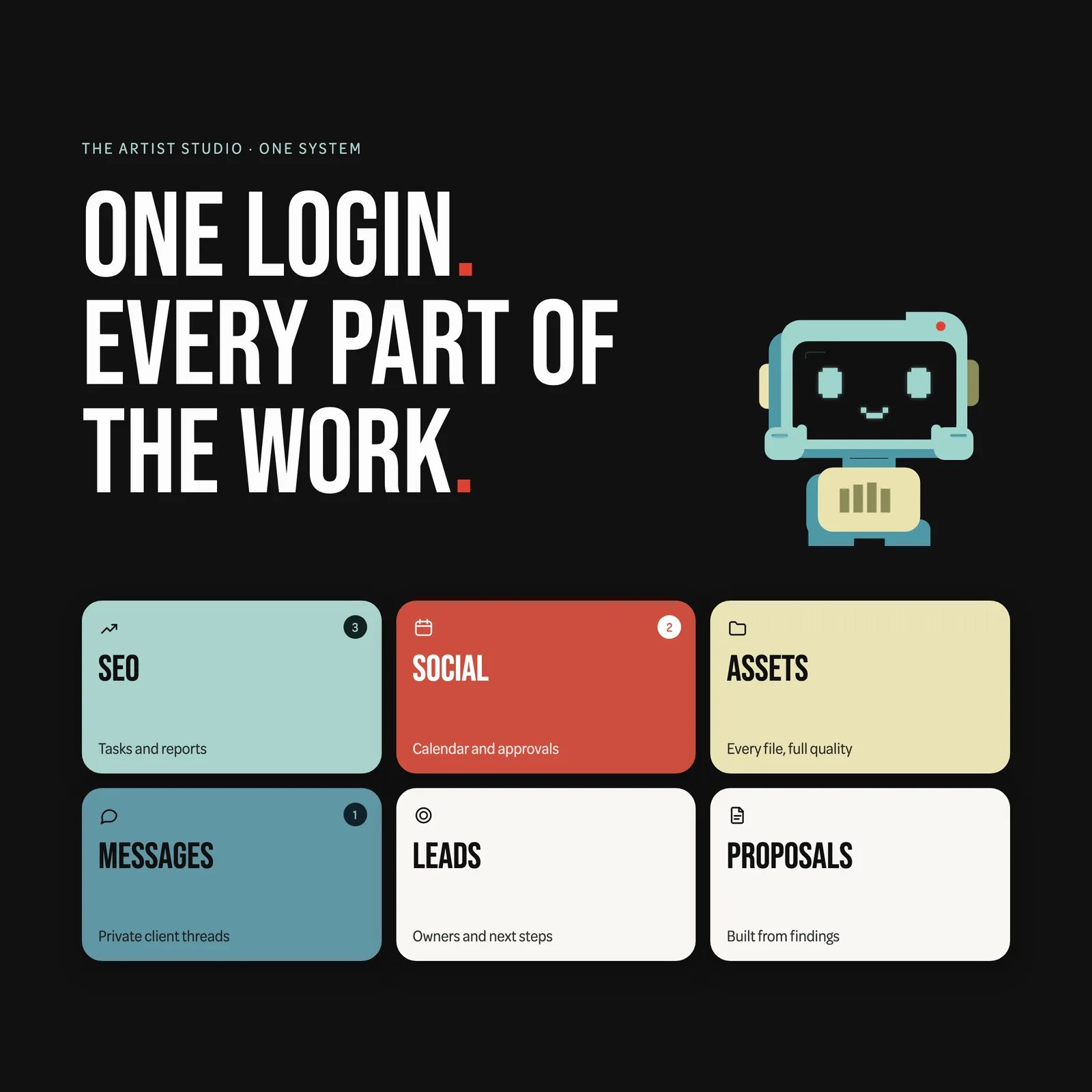
Bespoke business software is software built around the way one business actually works, instead of a product you rent and then bend your work to fit. In September we built our own. It is called One System, and it now holds our SEO work, social calendars, client files, reports, messages and sales pipeline behind one login. This is what it gave us, what it cost us, and when we think a bespoke system makes sense for a business like yours.
We are a small studio in Sherborne. We are not a software house, and a year ago we would not have attempted this. We did it because the tools we were paying for had quietly become the job, and because building software is now within reach of a small team in a way it simply was not before.
The short answer
- What it is: software built around how your business works, instead of a product you adapt to.
- When it is worth it: when you pay for several tools and still copy information between them, or when the way you work with customers is part of why they choose you.
- When it is not: when one off-the-shelf product already does the job, as with payroll, accounting or email.
- Our rule: buy the standard parts, build the bit that is you.
What is bespoke business software?
Off-the-shelf software is built for thousands of businesses at once. You get a lot of features, most of which you will never use, and the ones you need are arranged around somebody else’s idea of how work flows. Bespoke software starts from the other end. You map what your people and your customers actually do, then build only that, in the order it happens, with your names for things.
In practice most small businesses already run a bespoke system. It is just made of spreadsheets, a shared drive, email threads, a WhatsApp group and five or six subscriptions, held together by whoever remembers where everything is. The question is rarely “bespoke or not”. It is whether the glue should be a person’s memory or a piece of software.
Those subscriptions are also getting more expensive. Vertice’s SaaS Inflation Index, based on more than $75bn of software spend, found subscription prices up 16.4% year on year in June 2026, almost four times the rate of US inflation. And buying more tools does not always help. In Capterra’s 2025 survey of UK software buyers, 34% of dissatisfied buyers said the software cost more than expected, and 29% said it did not work with the systems they already had.
Why did a creative agency build its own software?
Because the work was fine and everything around the work was not.
A client would ask for last month’s numbers, and the answer lived in a PDF attached to an email from three weeks ago. A social post would be approved in a WhatsApp message nobody else could see. The logo file was “in the Drive somewhere”. Tasks came out of an SEO audit, got typed into a spreadsheet, and lost the evidence that justified them on the way. None of those tools was bad. The problem was the gaps between them, and the gaps were where our time went.
That cost is measurable. When Harvard Business Review tracked 137 people across three Fortune 500 companies, they switched between apps and websites around 1,200 times a day, losing just under four hours a week to reorienting themselves. That is roughly 9% of their working time, spent finding their place again.
All-in-one agency platforms and client portals exist, and they do parts of the job well. But each one asks you to work the way it was designed. The honest reason we built instead of bought is that no product joined up the specific things we do: search data turning into tasks, tasks turning into a written monthly report, social posts carrying their own files and approvals, and every conversation staying next to the piece of work it was about.
What is inside One System?
Here is a look around. The screens below are illustrative previews drawn with sample data, not a real client’s account, but every area shown is built and running.
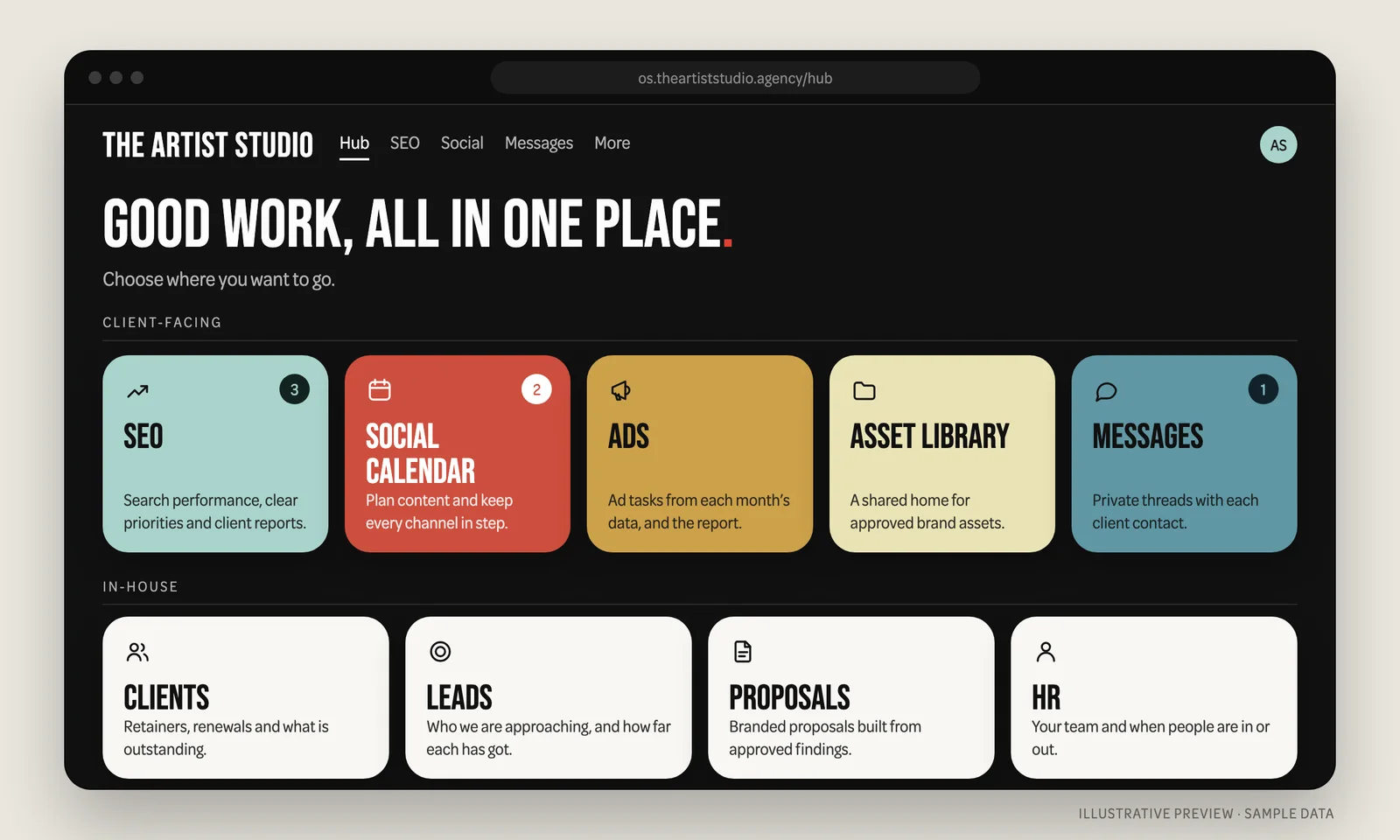
One login, one hub. Everyone signs in once and lands on a hub that shows only the areas their account can open. Clients see their own work. The studio sees client work and our in-house tools. Each person has their own named account, which can be suspended or revoked without changing anyone else’s password.
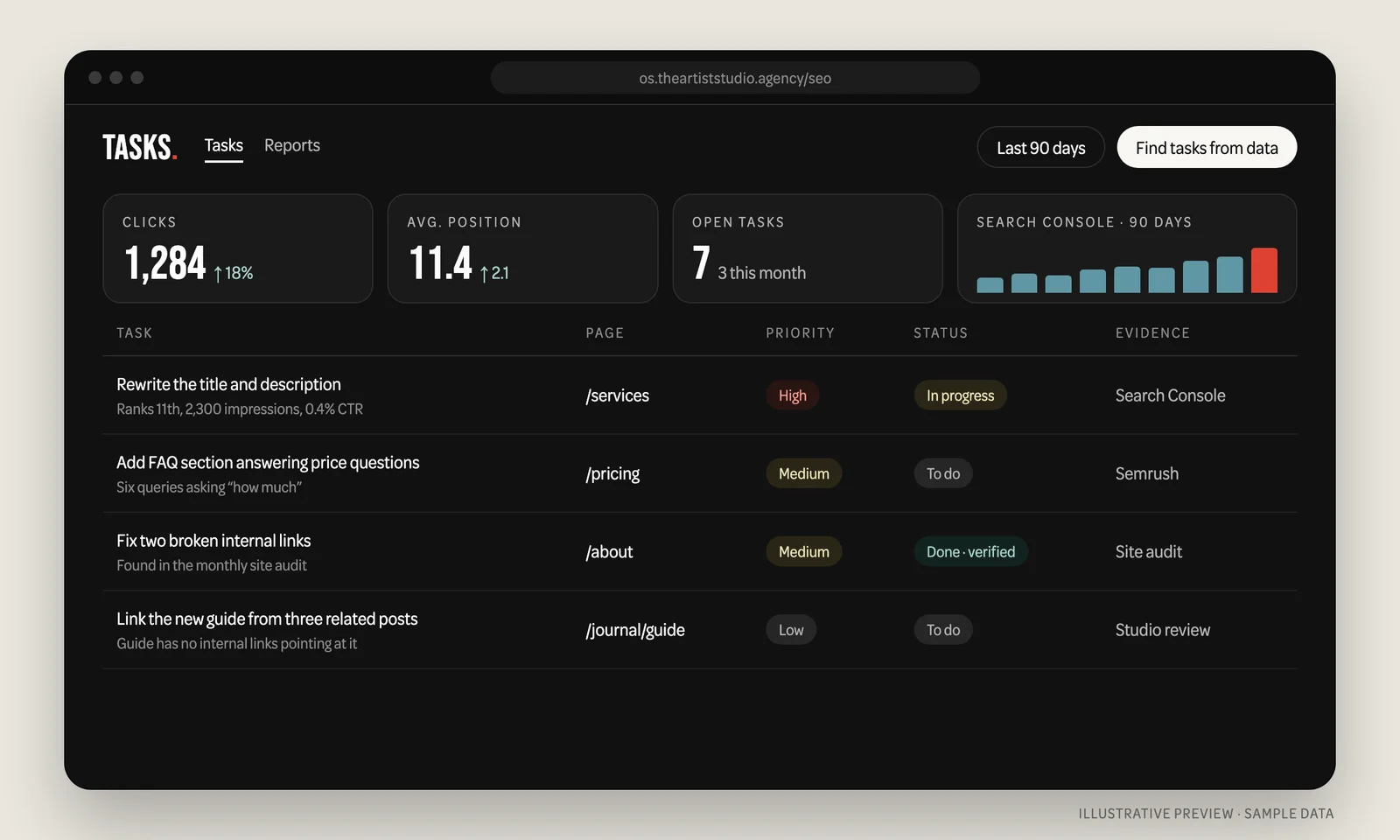
SEO tasks that keep their evidence. We drop the month’s search data in, and the system suggests tasks: a page stuck just off page one, an audit error, a keyword a competitor ranks for and you do not. Nothing becomes a task until a person ticks it. Every task keeps the page it changes and the evidence behind it, so “why are we doing this?” always has an answer.
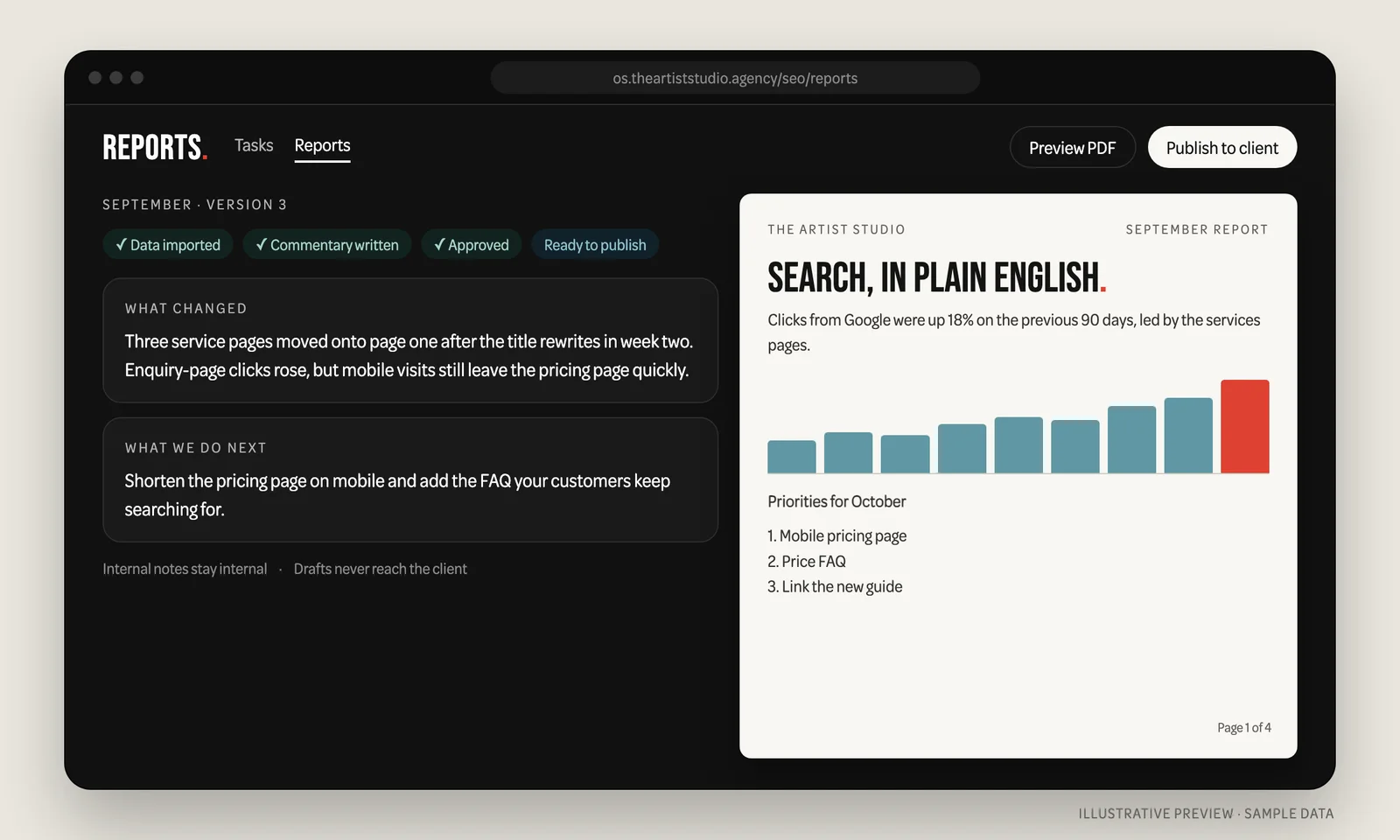
Reports written by a person. Monthly SEO, ads and social reports are built from the month’s data, then written up in plain English: what changed, what caused it, what we do next. Drafts stay internal until they are approved, and the finished report is published to the client’s own login and downloadable as a PDF.
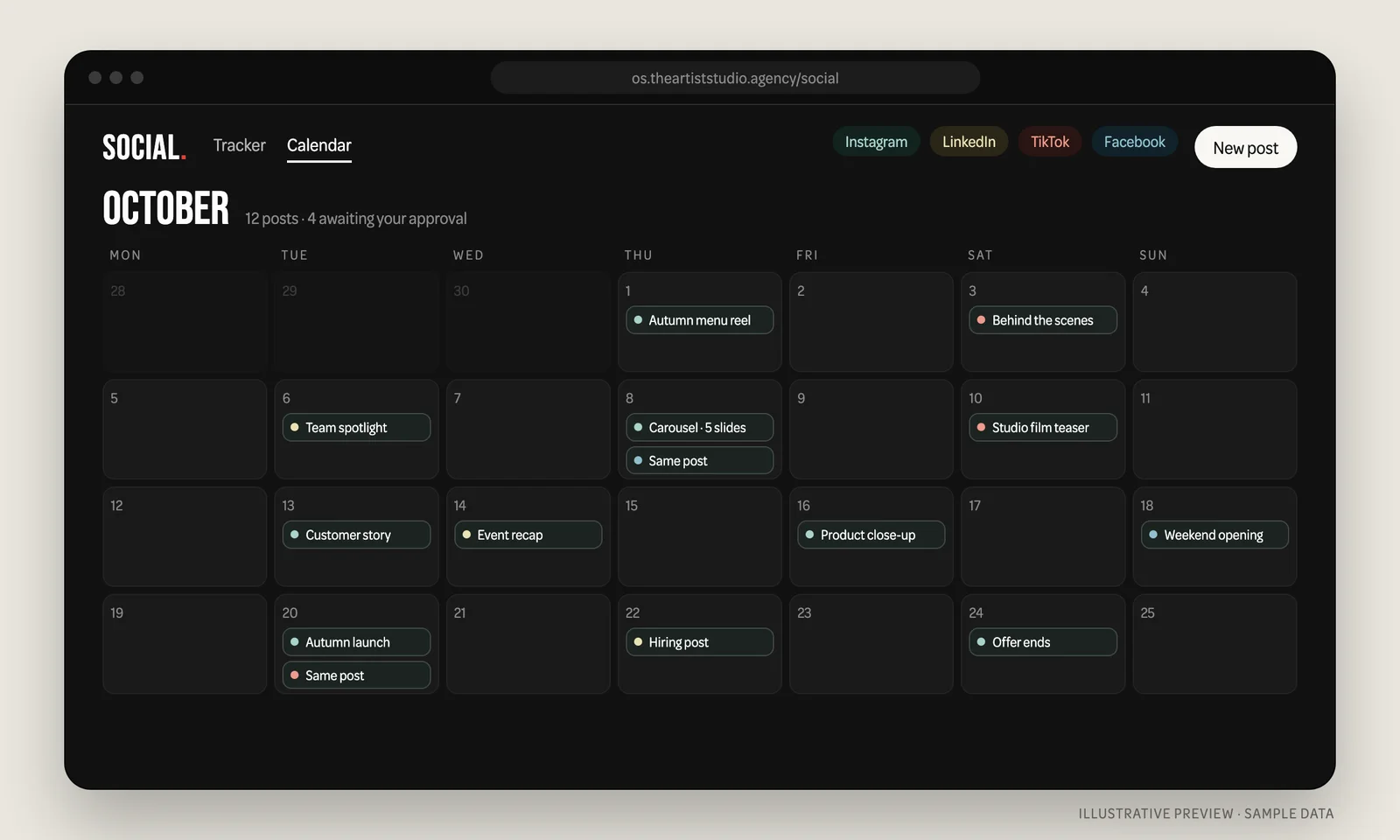
A social calendar with the files attached. One post can go to several platforms. Clients can see what is drafted, what is scheduled and what went out, and mark a post ready with a comment. Files uploaded to a post are filed into that client’s asset library automatically, so the photo in the post and the photo in the library are never two different versions.
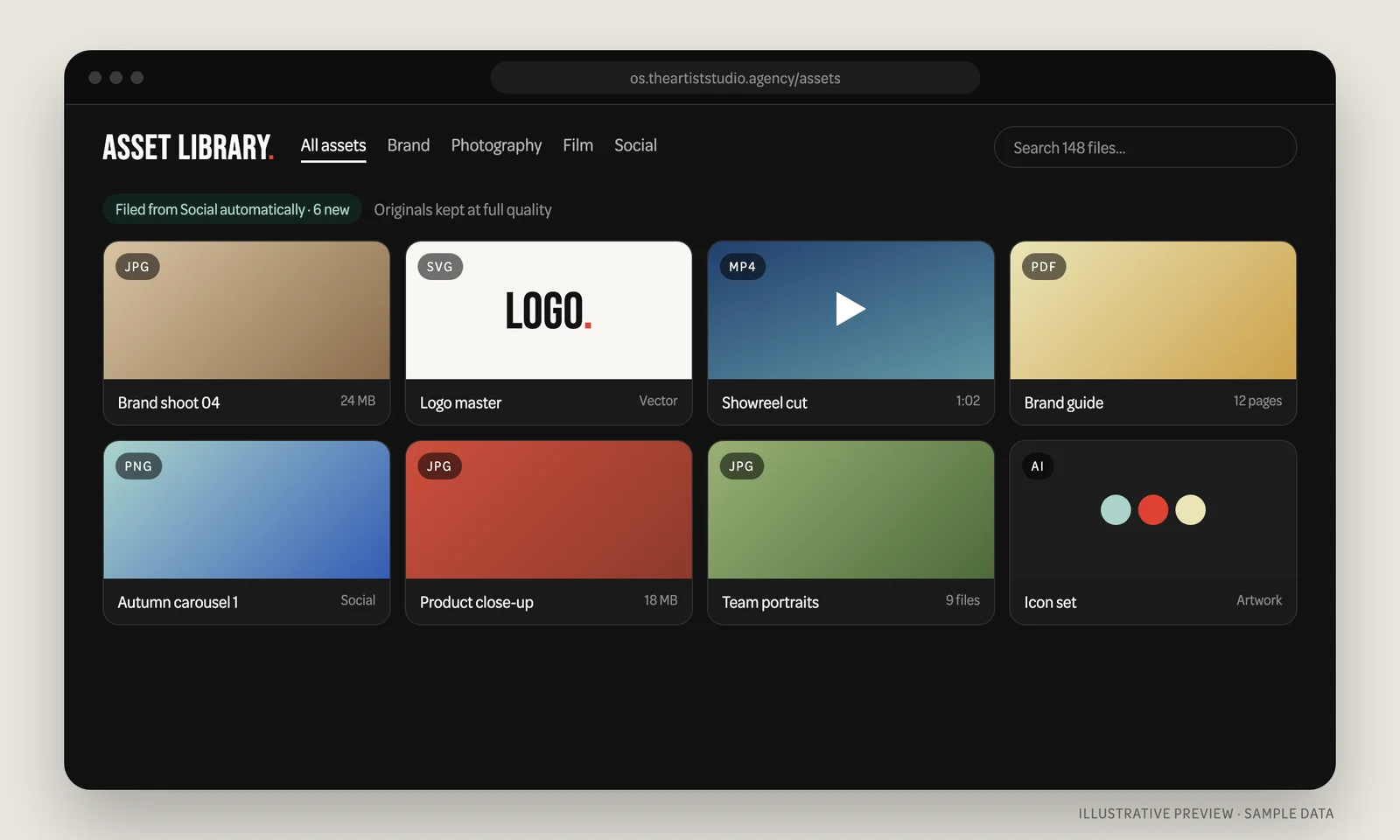
An asset library that ends “can you resend the logo?”. Logos, photography, film and print files live in one library per client, organised in folders and kept at full quality. Sharing a batch with a printer or a supplier is a download link that expires after one, seven or thirty days.
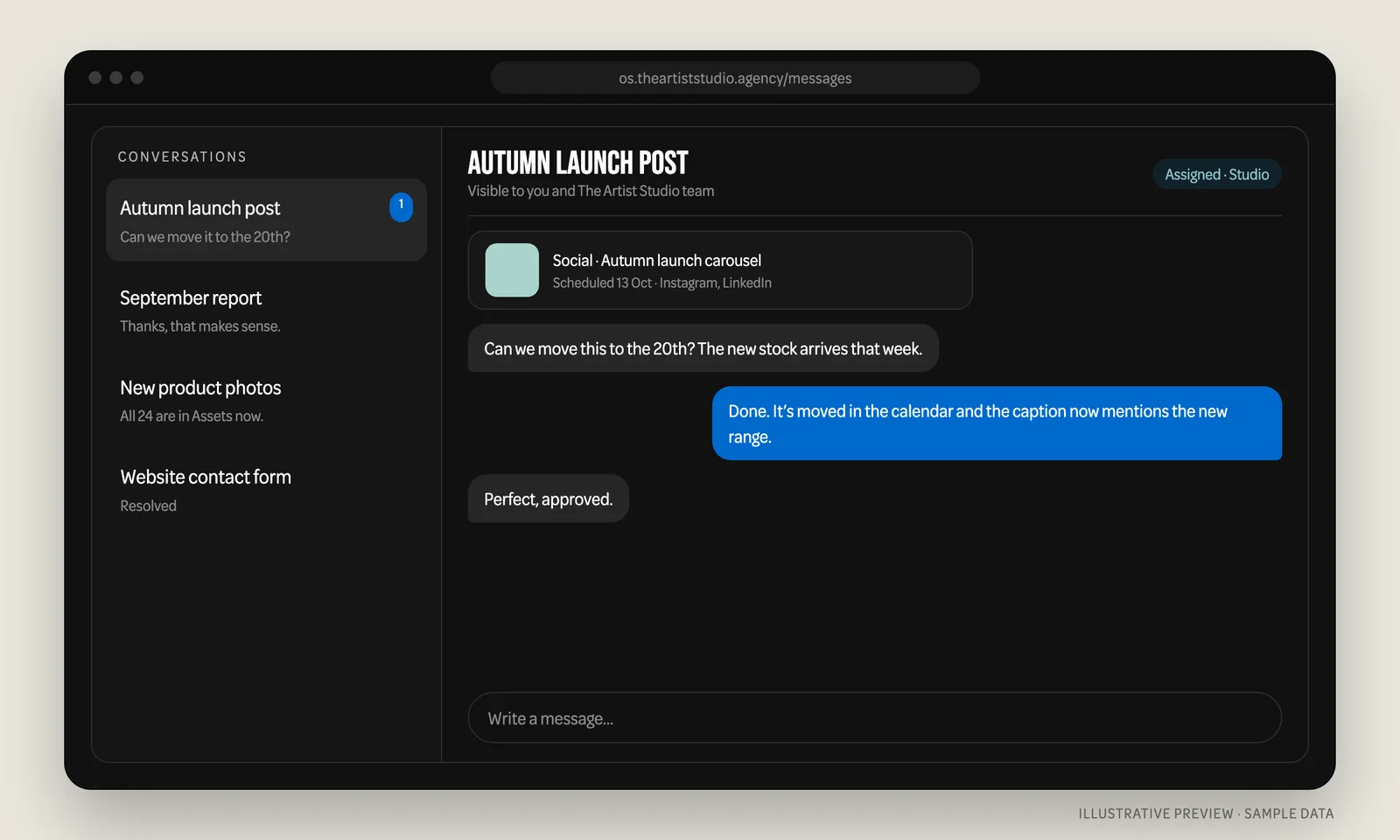
Messages that stay with the work. Each client contact has a private thread with the studio. A message can point at the exact post, file or report being discussed, so a decision never loses the thing it was about. Anyone at the studio can pick it up, which matters more than it sounds when someone is off.
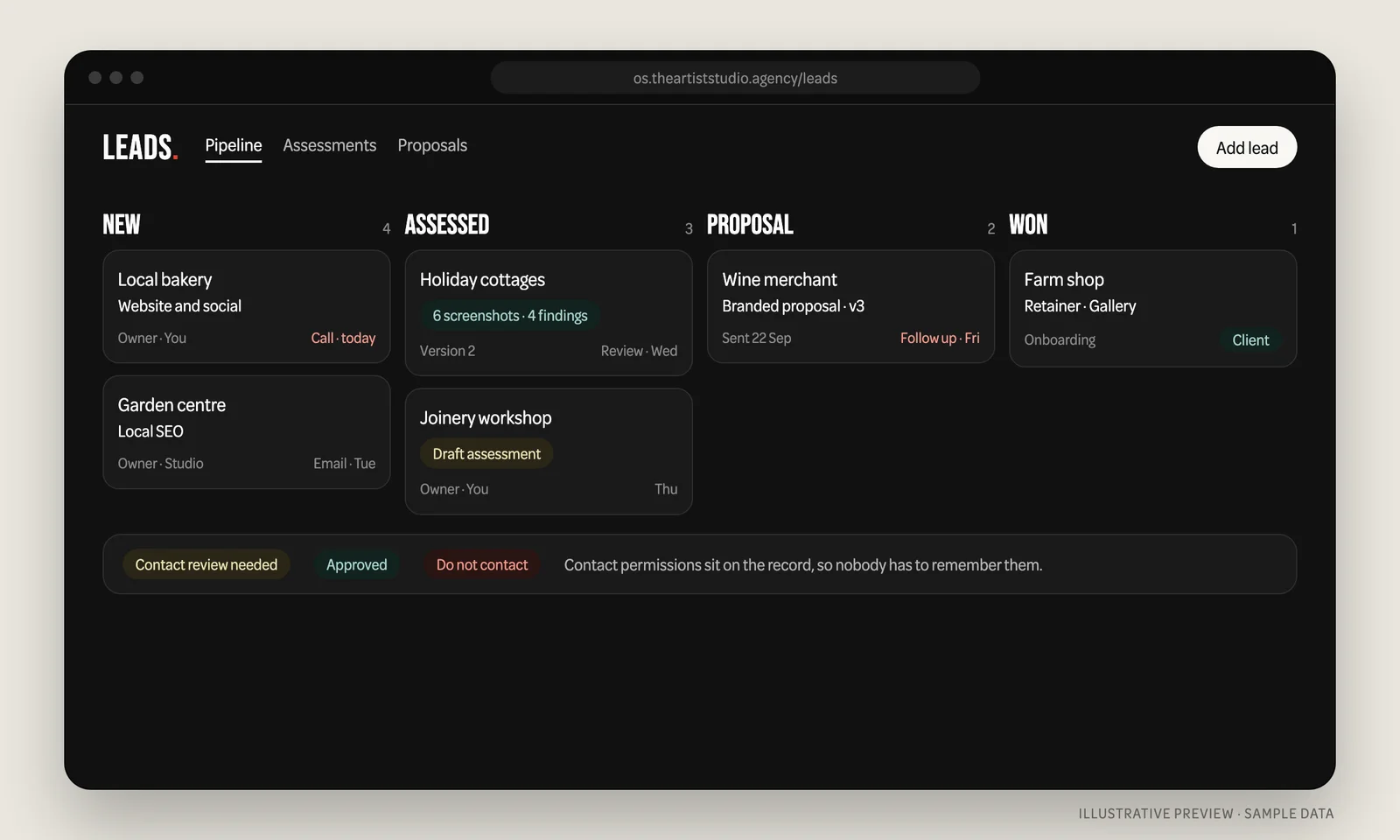
Leads and proposals, on the same record. Behind the scenes, new enquiries have an owner, a next action and a due date. Before we pitch, we save an assessment with dated screenshots and a clear label on what is verified and what is our assumption. Contact permissions sit on the record, so nobody has to remember who asked not to be phoned.
You can see the client side in more detail on our One System page.
What have we actually gained?
It is early, so we are not going to dress this up with percentages. These are the changes we can already see in our own work.
One place to look. The most useful thing a single system does is remove the question “where is it?”. Reports, files, tasks, posts and conversations are in one place, under one login, filed against the client they belong to.
Things are entered once. A file uploaded to a social post appears in the asset library. A task created from search data carries its evidence into the monthly report. Every time the same information does not have to be typed twice, a mistake does not get the chance to happen.
Decisions keep their context. Approvals and questions sit beside the work, not in a personal inbox or phone. When a colleague picks something up, they can see what was agreed and why.
Clients see the work, not just the invoice. What we did, what moved and what happens next is written down and signed off before it is published. That is a better conversation for both sides than a monthly PDF and a hopeful email.
Proper accounts instead of shared passwords. Each person has their own login and only sees what they should. Access can be changed for one person without disturbing anyone else, and changes are recorded.
It fits us, and it keeps changing. When something annoys us on a Tuesday, we can fix it that week. Longer date ranges on SEO data, posting one piece of content to several platforms, and filing social uploads straight into the asset library all came from noticing friction while doing the work. We do not wait for a vendor’s roadmap, and we do not pay for features we will never open.
We own it. The code, the data and the decisions are ours. Search Console and analytics accounts stay in our clients’ names; the system reads from them rather than replacing them. No price rise on a per-seat plan can change what the system costs to run.
The value is not another dashboard. It is fewer handoffs, fewer missing files and one clear place to see what has been done and what happens next.
How long did it take, and how did we build it?
Faster than we expected, and more carefully than you might assume.
The first version went up on 8 September 2026 as a simple SEO tool. Within three weeks it had grown into the whole system above, with more than 200 recorded changes, over 20 tagged releases and more than 600 automated tests that check it still does what it should every time something changes. It runs on Cloudflare, with private file storage and a database of its own, while our website, domain and email stay exactly where they were.
We designed and built it ourselves, using AI coding tools such as OpenAI’s Codex and Anthropic’s Claude Code to help with parts of the work. We have written before about where AI helps and where it does not, and building software turned out to be a very clear example of both. It is also worth being honest about the evidence: in a 2025 study by METR, experienced developers using AI tools on their own projects took 19% longer, while believing they had been sped up. Speed is not automatic. It depends on who is steering.
What AI did well: writing and rewriting large amounts of code quickly, and turning a plain-English description of a screen into something working within the hour. What it did not do: decide what should be built, notice when an imported report had turned a competitor’s web address into a to-do item for our own client, or know that a finished report needed a person’s approval before a client could see it. Every one of those came from us using the thing, reading what it produced and sending it back. The tests exist because we did not trust anything we had not seen fail and then pass.
What are the disadvantages of bespoke software?
There are real ones, and anyone selling you a bespoke system should say so first.
- You own the maintenance. When a SaaS product breaks, it is someone else’s problem. When your own system breaks, it is yours. Security updates, backups and fixes need a named person or partner who is responsible for them.
- It takes time to get right. Our first versions were wrong in ways we only found by using them. We built a client “health score” and took it out a week later. Some ideas only look good until you use them. Budget for iterations, not a single handover.
- Built is not the same as used. A feature existing proves nothing until people rely on it. We learnt to test with real work before calling anything finished, and to switch features on for a few people first.
- Security is a responsibility, not a feature. Individual accounts, permissions, private file storage and recorded access changes all had to be designed and tested. A spreadsheet shared by link has none of that, which is part of the case for building, but only if it is done properly.
- Key-person risk. If only one person understands the system, that is a weakness. Documentation, tests and a clear record of why decisions were made are what stop it becoming one.
- Some things should stay off the shelf. We did not rebuild email, accounting, Google Search Console or ad platforms. Our system reads from those tools and joins them up. Rebuilding something a mature product already does well is where bespoke projects waste money.
Bespoke or off-the-shelf: which does your business need?
A simple rule we would give any small business: buy the standard parts, build the bit that is you.
| Off-the-shelf is usually right when | Bespoke starts to make sense when |
|---|---|
| The process is the same for everyone, such as payroll, accounting or email | The way you work with customers is part of why they choose you |
| One tool already covers most of what you need | You are paying for several tools and still copying information between them |
| You need it working next week | Your team spends hours a week on admin that follows the same pattern |
| Nobody will own it once it is built | You want customers to log in and see their own work, orders or files |
| The price per user is small and stable | Per-user pricing is growing faster than the value you get |
If most of your answers sit in the left-hand column, keep your subscriptions and tidy how they connect. If several sit on the right, a small bespoke system, started with one part of the work, is worth a conversation.
Bespoke software examples for small businesses
The same thinking applies well outside marketing. A few examples of what a bespoke system could do, for the sort of businesses we work with across Dorset and Somerset:
- A client portal for an accountant, architect or consultant, so documents, approvals and updates live in one login instead of email chains.
- A trade or stockist area for a producer, where wholesale customers can find price lists, product photography and order history themselves.
- A job tracker for a workshop or trade business, from enquiry and quote to scheduled work and photographs of the finished job.
- A shared asset library for a hospitality group, so every site uses the right menu, logo and photography.
- A lead and proposal pipeline with owners, next actions and contact permissions, for any business that loses enquiries between people.
And if you work with us on your marketing, you get the benefit of ours: your reports, social calendar, files and conversations with us in one place you can sign in to.
How would we build one for you?
The way we built our own, one working piece at a time.
1. Map the work. We sit down with the people who do it and write down what actually happens, including the workarounds everyone has stopped noticing.
2. Pick the most painful gap. Not the whole business. One area where the time or the mistakes are obvious.
3. Build that, and use it. A first version your team uses on real work within weeks, not months, with a small group of people before everyone.
4. Grow it from what you learn. Each next piece joins the same system, so it becomes more useful rather than becoming another tool.
You keep ownership of your data throughout, and we will tell you plainly which parts should stay with the software you already pay for.
FAQ
What is bespoke business software?
Software designed around one business’s own processes, customers and terminology, rather than a general product sold to thousands of companies. For a small business it often replaces a patchwork of spreadsheets, shared folders, email threads and several subscriptions with one system that holds the work in one place.
What are the advantages and disadvantages of bespoke software?
The advantages are fit, fewer tools, information entered once, your own data, and the freedom to change it when your business changes. The disadvantages are that you are responsible for maintenance, security and backups, it takes iterations to get right, and it can depend on the people who built it unless it is properly documented and tested.
Is bespoke software worth it for a small business?
When the way you work with customers is part of your offer, or when you are paying for several tools and still copying information between them, often yes. When one off-the-shelf product already covers the job, usually not. Starting with one painful area keeps the risk and cost proportionate.
How long does it take to build a bespoke system?
A first working version of one focused area can be in use within weeks. Our own system went from a simple SEO tool to a full client platform in under three weeks, built by us with help from AI coding tools, and checked by more than 600 automated tests. Larger systems grow over months, one piece at a time.
Can one custom system replace several software subscriptions?
Often it can replace the ones that overlap and join up the rest. The sensible approach is to keep mature tools such as email, accounting and ad platforms, and build the part that connects them and fits how you work.
Who owns bespoke software?
That depends on the contract, so agree it in writing before any work starts. You should own your data, have a copy of it, and know who maintains the system and what happens if that relationship ends.
The Artist Studio is a full service digital agency on South Street in Sherborne, working with businesses across Dorset and Somerset. If you want to see One System properly, or talk about what a system built around your business might look like, get in touch.
The Artist Studio
The Old Mermaid, South Street, Sherborne, Dorset, DT9 3LU
By Antoine at The Artist Studio






.jpg)